TruckDocs®
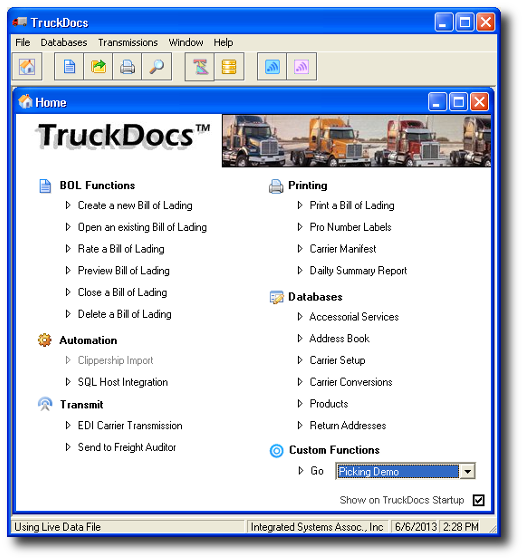
The Ultimate BOL SoftwareTruckDocs® was designed with the busy freight shipper in mind. This multi-user, network friendly software enables users to rate-shop truck freight carriers, print Straight and VICS Bills of Lading, ensure customer routing compliance, print PRO number labels, transmit Electronic BOL's to the carriers and to freight payment partners, and more!
With TruckDocs®, every workstation has unlimited access to address books, carrier & product databases, custom accessorial services & alternate return address tables. Everything a shipper needs to create a Bill of Lading - right out of the box!
Add one or more of these great add-ons for a completely automated shipping experience --> enhanced Clippership, AKA BluJay Parcel, integration, custom Routing Guide builder, EDI Transmission host interface utility, Windows® Scripting tools & TCP/IP communications. The possibilities are endless.
Standard Features
- Straight & VICS Bill of Ladings formats.
- Build shipments spanning over multiple days.
- Easily Generate multi-order consolidated BOLs.
- 17 digit unique BOL & carrier PRO number assignment.
- Rate shops for least cost using your contracted rates.
- Carrier Manifest and Daily Summary reports.
- Commodity table to store product description information.
- Automatic Collect and 3rd Party Billing lookup features.
- Ability to add company logos and custom document printing.
- Carrier setup table to maintain PRO Numbers, Rates and surcharges.
- Accessorial table to modify or create custom services offered by your freight carrier.
Enhanced Features |
|
|
Automate BOL generation even more with integration to your WMS or order processing system. Making use of TruckDoc’s robust interface utility and scripting tools can really make BOL creation and data post back to your in-house customer database a breeze! From a scan of a barcode, both order header and commodity details can be retrieved, the BOL created, and carrier and shipping details returned for shipment confirmation. |
Clippership integration tools takes automation to the next level for truck freight processing together with small parcel carrier manifesting & compliance. Easily collect order & commodity data in Clippership and then import it into TruckDocs® for BOL creation while consolidating both large and small orders together saving $$. TruckDocs® automatically returns carrier, pro number, & charges back to Clippership and then auto archive the transactions. |
|
Clerical errors causing you pain? TruckDocs® e-BOL helps to ensure mistakes aren’t made by transmitting EDI 211 Electronic BOLs to carriers and to your freight payment partner. |
Don’t let your carrier contracts and discounts go to waste or pay fines to customers for improper carrier selection. TruckDocs® Routing Guide utility supports both Prepaid and Customer Specific Routing Guide setups. |



|
We are pleased to inform you that TruckDocs® is developed & maintained by our own in-house engineers. We pride ourselves in providing outstanding software with the highest level of customer support. |
Compatible with...
- Clippership / BluJay Parcel
- ODBC to any database
- VBScript to other interfaces
- TCP/IP Communications
TruckDocs® can also be used by itself as a stand-alone application.
Software Requirements
- Microsoft Windows® 10 (32-bit & 64-bit)
- Microsoft Windows® 7 Professional (32-bit & 64-bit)
Hardware Requirements
- Microsoft Windows®-compatible PC
- 20 MB Hard Disk Space
Optional
- 4" x 6" label printer
- 8.5" x 11" plain paper printer
- Internet connection for electronic BOL